A logo is an important element of every brand because it acts as a visual representation of the business and helps customers recognize and remember the company. With a well-designed logo, organizations can build trust with clients while communicating credibility and reliability. The colors, fonts, and visual elements used in the logo also help convey the brand’s personality and area of business. Companies developing a new visual identity can create a logo that reflects these qualities and remains recognizable across different formats.
Repeated exposure to a logo through websites, social media, email communications, printed materials, merchandise, and other channels creates a strong association with the brand and reinforces recognition. Because people naturally recognize images more easily than text, a simple and professional logo can help clients recall both the brand and their experiences with it.
In email marketing, a logo appearing near the sender’s name in the inbox helps a message stand out and makes the sender instantly identifiable. Companies and email marketers adopting the BIMI protocol may therefore benefit from stronger recipient engagement and email deliverability. An email signature maker can further reinforce brand consistency by presenting the company’s logo, contact details, and visual identity clearly in every outgoing message.
What is BIMI?
BIMI stands for Brand Indicators for Message Identification. It is a protocol that allows an organization to showcase its logo in the recipient’s inbox after being authenticated with SPF, DKIM, and DMARC. These three protocols verify the sender’s information and the message’s authenticity and work with BIMI to notify email users that the sender is legitimate.
How Does BIMI Work?
The process that email receiving servers follow to verify the email’s compliance with BIMI is:
1. Email Authentication Check
When an email reaches the destination server, the server checks if the sending domain meets specific authentication requirements. It finds authentication records in DNS and verifies that:
- The domain has a valid SPF record and the source IP is included in the record (SPF passed);
- The domain has a valid DKIM record and the message hasn't been altered (DKIM passed);
- The domain has a valid DMARC record and DMARC passes either based on SPF or DKIM alignment;
- The DMARC policy is set to "quarantine" or “reject”.
2. BIMI Record Check
If DMARC requirements are met, the server looks for a BIMI record in DNS.
3. Logo Retrieval
The receiving inbox provider retrieves the logo from the location specified in the BIMI record and verifies its compliance to the SVG Tiny 1.2 Portable/Secure standard.
4. VMC or CMC Verification
When the logo format is verified, the receiving server retrieves the VMC or CMC certificate file specified in the BIMI record and checks if the certificate verifies the logo.
It is possible to create a BIMI record without a certificate file, but not all inbox providers supporting BIMI will display the logo if it’s not certified.
5. Logo Display in the Inbox
When the verifications are passed, the inbox provider places the logo alongside the sender’s name in the mailbox.
How to Set up BIMI to Display Your Logo in Email Inboxes
As simple as the process seems, there are a few important things that you must take into account before setting up BIMI:
- You need to have access to the domain’s DNS in order you can publish a BIMI TXT record;
- Your DMARC policy must be set to “quarantine” or “reject”;
- You need to create your logo in the SVG format;
- The logo SVG file must be publicly accessible via HTTPS;
- You need to get a VMC or CMC for your logo.
Here is a step-by-step guide for a BIMI implementation:
1. Ensure your emails pass DMARC authentication
Since the BIMI configuration requires an enforcement policy, the first step to take is to verify that the emails sent by your legal sources pass DMARC authentication. Use a DMARC monitoring tool like DMARKOFF to collect and process DMARC reports, and identify any email authentication issues. Fix those issues before moving to step 2.
2. Create your logo SVG file
BIMI doesn’t accept a regular .png or .jpg file. Therefore, after you create a great logo, you must convert the logo into the SVG format following strict SVG Tiny 1.2 Portable/Secure (SVG P/S) guidelines:
- it must be a square vector graphic under 32 KB,
- It must use absolute pixel dimensions,
- It must contain no animations, scripts, or external links.
To do it right, it is recommended to use a BIMI logo creator tool.
When the logo SVG file is ready, upload it to a web site where it can be publicly accessible via HTTPs. Example:
https://company.com/logo.svg
3. Get a VMC or CMC file
A Verified Mark Certificate (VMC) is a digital certificate that proves the authenticity of a trademark logo associated with the sender’s domain. Only companies with registered trademarks can get VMC.
An alternate option is the Common Mark Certificate (CMC), which allows organizations without a registered trademark to display their logo in the inboxes. While CMC allows more brands to use BIMI, it is not currently supported by all inbox providers.
VMC and CMC are issued by trusted third-party certificate authorities, for example DigiCert, after the organization has successfully verified its identity.
After verification, you receive a certificate file in the .pem format. Upload it to a web site where it can be publicly accessible via HTTPs. Example:
https://company.com/certificate.pem
4. Create and publish a BIMI record
The easiest way to get a valid BIMI record is to utilize a BIMI record generator tool. Provide the URLs of your logo file and certificate file and get an accurately formatted BIMI record.
If you create a BIMI record manually, use these tags:
v=BIMI1: the starting tag indicating the protocol type;
l=: the tag specifying the logo SVG file location;
a=: the tag specifying the VMC or CMC certificate file location;
To publish a BIMI record in DNS, access your domain’s DNS settings and add a new record as follows:
Hostname: use default._bimi if your DNS provider automatically appends the domain name; if it doesn’t, use default._bimi.yourdomain.com.
Type: TXT
Value: the generated BIMI record value.
Save the changes.
Examples of BIMI records in DNS:
default._bimi.company.com TXT "v=BIMI1; l=https://company.com/logo.svg;"
default._bimi.company.com TXT "v=BIMI1; l=https://company.com/logo.svg; a=https://company.com/certificate.pem;"
How to Check a BIMI Record
To test if your BIMI record is valid, use a BIMI checker tool. For instance, the services like GlockApps and DMARKOFF provide a free BIMI checker publicly available.
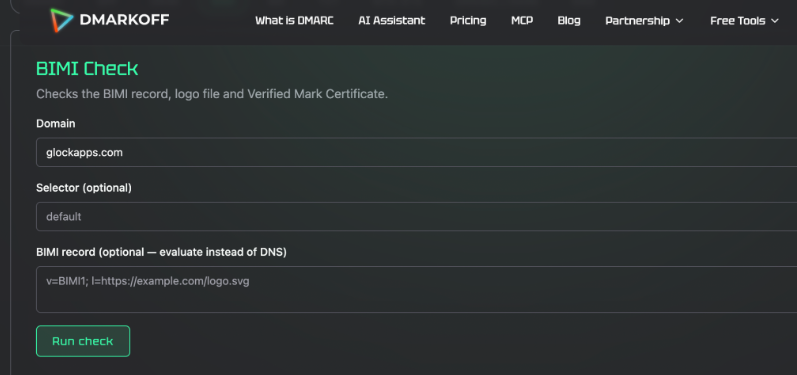
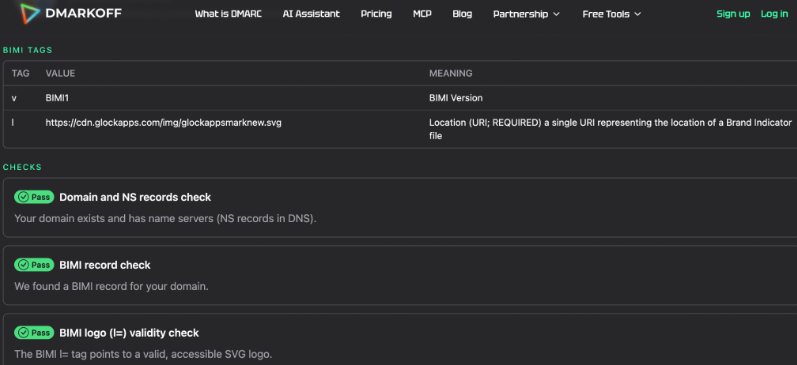
A BIMI checker performs a real-time BIMI record verification giving you an instant report including the results for:
- existing name servers (NS records in DNS);
- published BIMI record validity;
- BIMI logo validity.
What Inbox Providers Support BIMI Logos
The number of inbox providers supporting BIMI logos is growing, but the requirements for a VMC/CMC certificate vary. Below is the list of the major inbox providers with a BIMI logo support and their requirements for a certificate:
Gmail/Google Workspace: VMC or CMC is required
AOL/Yahoo Mail: VMC or CMC is recommended but not required
Apple Mail/iCloud: VMC is required
Fastmail: certificate is not required
Zoho mail, LaPoste, Gmx.de, Web.de, Onet.pl and other local providers have different levels of BIMI support.
Outlook/Office365 is not currently supporting BIMI logos.
How Logos Help Improve Email Marketing
A beautiful logo created with the utilization of a professional logo maker tool works as a visual symbol of a company allowing people to better remember the brand and differentiate it from the competitors on the market.
In email marketing, logos help companies establish recognition, credibility, sender reputation, and obtain high user engagement and inbox deliverability for their messages.
Specifically, what brands can achieve with the utilization of their logos for email communications is:
- Create reputation
A well-designed logo incorporated into email communications sent by a company helps position it as a professional and trustworthy brand.
- Simplify recognition
A logo allows the recipient to easily recognize the email sender. Specifically, a logo that appears near the sender’s name in the inbox instantly identifies the sender without the need to open the email.
- Increase email opens, clicks, and conversions
When the recipients easily recognize the sender by the logo, they are more likely to open the email and interact with it.
- Increase deliverability
Positive user interactions with a company’s emails send signals to inbox providers that these messages are welcomed – thus, the percentage of emails delivered in the inboxes increases.
- Strengthen email security
BIMI logos appearing in the email inboxes reinforce email security because of the DMARC policies needed to implement BIMI. Organizations can further strengthen their defenses against phishing and other email-based threats by combining BIMI with top security awareness training for employees.
Conclusion
Every brand needs its visual representation – a logo. A logo helps people to remember the brand, recognize it, distinguish it from competitors, and associate it with a particular experience. Today, you can easily create a nice logo reflecting your brand’s name and area of business with professional design services also supporting AI logo generator tools.
In email marketing, a logo used in email messages shows professionalism, establishes reputation, and increases trust. A logo displayed by the BIMI protocol helps recipients recognize the sender immediately, which is particularly useful when building relationships with subscribers. Brands implementing BIMI for their emails can benefit from better engagement, higher inbox deliverability, and stronger email security.
Julia Gulevich is the author of numerous articles on email deliverability and email authentication. She is known for her practical, data-driven approach that helps teams get more emails into inboxes and keep sending practices healthy.
Julia works closely with senders every day, providing technical support, troubleshooting deliverability issues, and making complex topics such as email infrastructure, authentication, and sender reputation easier to understand and deal with.
Written by DesignCrowd on Wednesday, August 26, 2026
DesignCrowd is an online marketplace providing logo, website, print and graphic design services by providing access to freelance graphic designers and design studios around the world.
